Building a Customer Registration Workflow with AWS Lambda Durable Functions (TypeScript)
Modern user registration flows are no longer simple “insert a record and return 200 OK”. They often involve multiple asynchronous steps, external systems, and human interaction (like email verification).
In this post, we’ll walk through how to build a robust, long-running customer registration workflow using AWS Lambda Durable Functions (Durable Execution SDK) with TypeScript.
The complete code for this demo is available on GitHub: lambda-durable-execution-demo
1. What Are We Trying to Achieve?
We want to build a reliable customer registration process with the following characteristics:
✅ Functional requirements
- Accept customer registration data via an HTTP API
- Create a customer record
- Send an email verification link
- Pause execution until the user clicks the verification link
- Resume execution once verification is complete
- Mark the customer as verified and send a welcome email
✅ Non-functional requirements
- Handle long-running workflows (hours or days)
- Survive Lambda restarts and failures
- Be replay-safe and deterministic
- Avoid polling or complex state machines
- Keep the code readable and maintainable
2. Why AWS Lambda Durable Functions?
Traditional Lambda functions are:
- Stateless
- Short-lived (15 minutes max)
- Not ideal for workflows involving waiting for external events
Durable Functions solve this by providing
- State persistence
- Automatic replay
- Durable timers
- Callback-based resumption
In short, Durable Functions let you write workflow-style code that:
- Looks synchronous
- Executes asynchronously
- Can pause for days
- Automatically resumes where it left off
This makes them perfect for:
- User onboarding
- Email verification
- Order processing
- Approval workflows
- Saga-style orchestration
3. High-Level Architecture
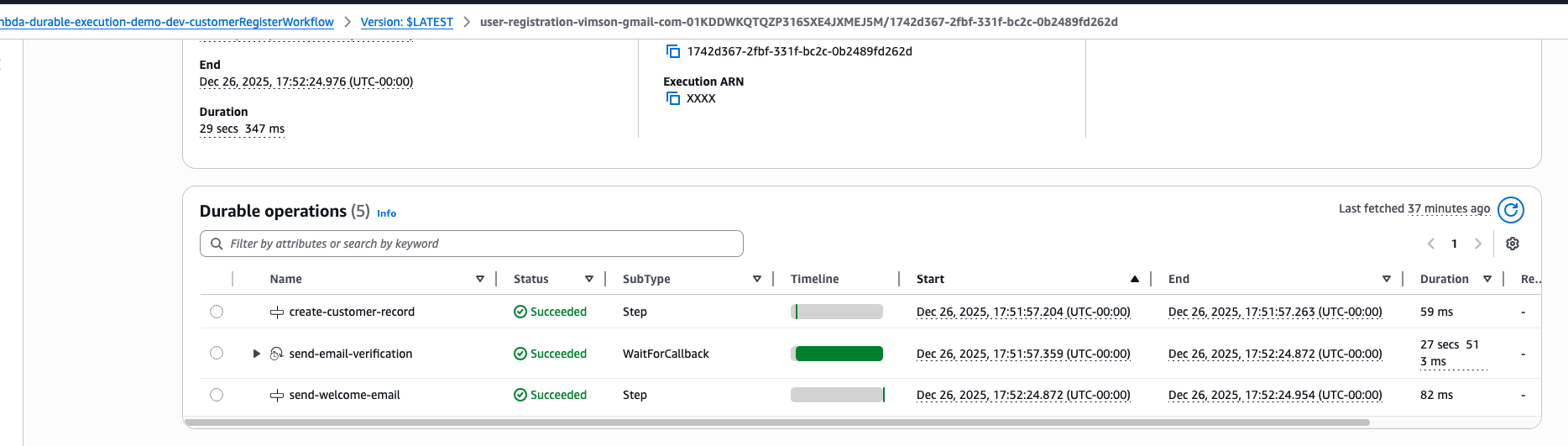
Here’s what our flow looks like:
- HTTP API receives registration request
- API starts a durable workflow
- Workflow:
- Creates customer
- Sends verification email
- Waits for callback
- User clicks verification link
- Verification handler:
- Validates token
- Signals durable workflow
- Workflow resumes:
- Marks email verified
- Sends welcome email
- Completes successfully
4. Starting the Durable Workflow (Register Handler)
This handler accepts the registration request and starts the durable workflow asynchronously.
import { InvokeCommand, LambdaClient } from '@aws-sdk/client-lambda';
import { ulid } from 'ulid';

const client = new LambdaClient({});

const postHandler = async (event) => {
  const { body } = event;

  const functionArn = `${process.env['REGISTER_WORKFLOW_FUNCTION_ARN']}:$LATEST`;

  const command = new InvokeCommand({
    FunctionName: functionArn,
    InvocationType: 'Event',
    Payload: JSON.stringify({ ...body }),
    DurableExecutionName: `user-registration-${body.email}-${ulid()}`,
  });

  await client.send(command);

  return {
    statusCode: 201,
    body: JSON.stringify({ message: 'Customer Created' }),
  };
};
Key points
- Uses
InvocationType: 'Event'(async) - Uses a unique DurableExecutionName
- The API responds immediately
- The workflow continues independently
5. The Durable Customer Registration Workflow
This is the heart of the system.
async function customerRegisterWorkflow(input, context) {
  logger.trace('Starting customer registration workflow', { input });

  // Step 1: Create customer
  const customerCreatedStep = await context.step(
    'create-customer-record',
    async () => {
      const customerId = await createCustomer({
        email: input.email,
        firstName: input.firstName,
        lastName: input.lastName,
        passwordHash: input.password,
        status: 'REGISTERED',
      });

      return { customerId };
    }
  );

  // Step 2: Send verification email & wait
  const emailVerificationStep = await context.waitForCallback(
    'send-email-verification',
    async (callbackId) => {
      await sendVerificationEmail(
        { id: customerCreatedStep.customerId, ...input },
        callbackId
      );
    },
    {
      timeout: { seconds: 172800 }, // 48 hours
    }
  );

  // Step 3: Mark verified and complete
  await context.step('send-welcome-email', async () => {
    await updateCustomer({
      id: customerCreatedStep.customerId,
      status: 'EMAIL_VERIFIED',
    });

    return {
      customerId: customerCreatedStep.customerId,
      registrationStatus: 'Successful',
    };
  });
}
Why this works so well
context.step()persists results durablywaitForCallback()pauses execution without running- The workflow can wait up to days
- If Lambda restarts, the workflow resumes from history
6. Sending the Verification Email
The verification email includes:
- A secure verification token
- The durable
callbackId
When the user clicks the link, we can resume the workflow.
7. Verification Handler (Resuming the Workflow)
This handler is invoked when the user clicks the verification link.
import {
  LambdaClient,
  SendDurableExecutionCallbackSuccessCommand,
} from '@aws-sdk/client-lambda';

const client = new LambdaClient({});

const verifyEmailHandler = async (event) => {
  const { token } = event.queryStringParameters;
  const customerId = verifyEmailVerificationToken(token);

  const customer = await getCustomerbyId(customerId);
  if (!customer) {
    return { statusCode: 404, body: 'Customer Not Found' };
  }

  const command = new SendDurableExecutionCallbackSuccessCommand({
    CallbackId: customer.callbackId,
    Result: JSON.stringify({
      customerId,
      emailVerified: true,
      timestamp: Date.now(),
    }),
  });

  await client.send(command);

  return { statusCode: 200, body: 'Email Verified' };
};
8. Durable Workflow Configuration in serverless framework
  customerRegisterWorkflow:
    handler: src/handlers/customers/register-workflow.handler
    durableConfig:
      executionTimeout: 86400        # 24 hours
      retentionPeriodInDays: 7       # Execution history retained for debugging
    environment:
      TABLE_NAME: !Ref Table
      EMAIL_VERIFICATION_SECRET: ${env:EMAIL_VERIFICATION_SECRET}
      FROM_EMAIL: ${env:FROM_EMAIL}
      API_URL: !Sub "https://${HttpApi}.execute-api.${AWS::Region}.amazonaws.com"
What happens here?
- Token is validated securely
- The customer is identified
- The durable workflow is signaled
- The paused workflow resumes automatically
No polling. No cron jobs. No custom state handling.
8. Why This Pattern Is Powerful
🚀 Advantages
- Handles long-running workflows
- Fully serverless
- No manual state management
- Easy to reason about
- Highly fault-tolerant
🧠 Ideal Use Cases
- User onboarding
- Email / phone verification
- Approval workflows
- Payment authorization flows
- Multi-step business processes
9. Final Thoughts
AWS Lambda Durable Functions allow you to write workflow code that looks synchronous but behaves asynchronously and durably.
In this demo, we:
- Started a durable workflow from an API
- Orchestrated customer registration
- Paused for human interaction
- Resumed execution safely
- Completed the workflow cleanly
This pattern scales extremely well and avoids the complexity of Step Functions for code-heavy workflows.